Paginate repeating section
Description
Can be used to paginate the records in a Repeating Section if the UX is bound to SQL tables.
Discussion
The Paginate repeating section property defines whether or not the repeating section should be a fixed (number of pages) size, the template for the message showing what numbered page of repeating section records is currently shown, and you specify the icons to use in the Repeating Section navigation. If checked, the following properties are exposed so you can define the pagination properties for the repeating section:
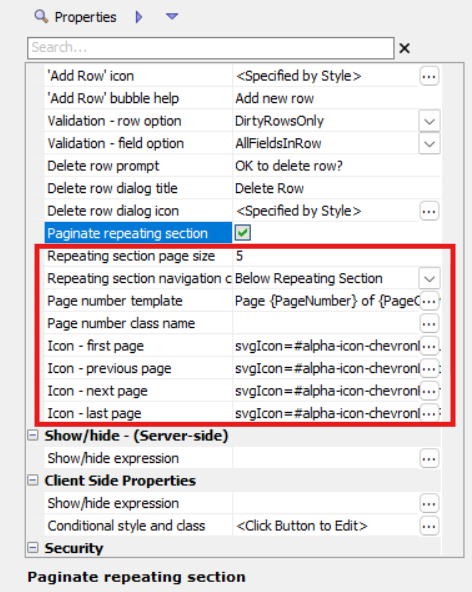

- Property
- Description
- Repeating section page size
The size (number of pages) of the paginated repeating section.
- Repeating section navigation control - Position
Specifies if the Repeating Section navigation buttons should be shown above or below the Repeating Section.
- Page number template
Specify the template for the page number display. Your template can include these placeholders: PageNumber PageLinks (hyperlinks to navigate to a particular page) goToPage (to navigate to a particular page when the user enters a page number and then presses ENTER) and PageCount. TIP: Set template to blank to eliminate the message.
- Page number class name
Specify the Class Name(s) from the CSS Class Name Selector Select the CSS class name(s) to apply to the paginated repeating section.
- Icon - first page
Specify the icon or image to use for the first page. Options include SVG Icons, CSS Icons, Images, etc.
- Icon - previous page
Specify the icon or image to use to navigate to the previous page. Options include SVG Icons, CSS Icons, Images, etc.
- Icon - next page
Specify the icon or image to use to navigate to the next page. Options include SVG Icons, CSS Icons, Images, etc.
- Icon - last page
Specify the icon or image to use for the last page. Options include SVG Icons, CSS Icons, Images, etc.
If you have several controls laid side by side on the repeating section, you will want to make sure that the Paginate repeating section shows these fully. The Pagination controls will allow the user to scroll through the records in the repeating section
When you navigate to a new page or records in a Repeating Section, the client-side beforeRptSectionNavigate event fires. If your code returns false, the navigation is aborted.
See Also